



In today’s digital world, online banking has become an essential part of managing personal finances. Customers no longer need to visit bank branches for every transaction. With secure internet banking services, users can check account details, transfer money, pay bills, manage cards, and access various banking facilities from anywhere. HDFC NetBanking is one of the most popular internet banking platforms in India, offering a wide range of digital banking services to millions of customers.
HDFC NetBanking allows customers of HDFC Bank to access their accounts online through a computer, laptop, or mobile browser. The platform is designed to provide convenient, fast, and secure banking solutions while reducing dependency on physical branches.
What is HDFC NetBanking?
HDFC NetBanking is an online banking service that allows customers to perform banking activities digitally. After registering for the service, customers can log in using their customer ID and password to manage their accounts.
The service provides access to various banking functions, including checking account balances, viewing transaction history, transferring funds, paying utility bills, managing debit and credit cards, applying for banking products, and downloading account statements.
HDFC NetBanking is available 24 hours a day, allowing customers to perform transactions according to their convenience without worrying about banking hours.
Features of HDFC NetBanking
HDFC NetBanking comes with several features designed to make banking easier and more efficient.
1. Account Balance and Transaction Details
Customers can instantly check their savings account, current account, or other linked account balances. They can also view recent transactions and download account statements for financial tracking and record keeping.
2. Fund Transfer Facility
One of the most commonly used features of HDFC NetBanking is online money transfer. Customers can transfer funds through different methods, including:
- NEFT (National Electronic Funds Transfer)
- RTGS (Real Time Gross Settlement)
- IMPS (Immediate Payment Service)
- Transfers between HDFC accounts
This allows users to send money quickly without visiting a bank branch.
3. Bill Payments
HDFC NetBanking provides convenient bill payment options. Customers can pay electricity bills, mobile bills, broadband bills, insurance premiums, and other utility payments directly from their bank accounts.
Users can also set up automatic payments for recurring bills.
4. Credit Card Management
HDFC credit card users can manage their cards through NetBanking. Available services include:
- Checking credit card statements
- Paying credit card bills
- Viewing reward points
- Managing card settings
- Requesting card-related services
5. Online Deposits and Investments
Customers can open fixed deposits (FDs) and recurring deposits (RDs) online through HDFC NetBanking. The service also provides access to various investment-related options depending on customer eligibility.
6. Loan Services
HDFC NetBanking allows customers to view existing loan details, check repayment schedules, download statements, and explore eligible loan offers.
How to Register for HDFC NetBanking
Customers can register for HDFC NetBanking through different methods. The registration process is simple and requires basic account details.
Registration Through the HDFC Bank Website
- Visit the official HDFC Bank website.
- Select the NetBanking registration option.
- Enter the required details, such as customer ID and registered mobile number.
- Verify identity through OTP authentication.
- Create a secure login password.
- Complete the registration process.
After successful registration, customers can access their account using their login credentials.
Registration Through ATM
Customers can also register for NetBanking using an HDFC Bank ATM. After inserting their debit card and entering the PIN, they can select the NetBanking registration option and follow the instructions.
HDFC NetBanking Login Process
Logging into HDFC NetBanking is simple:
- Open the official HDFC Bank website.
- Click on the NetBanking login option.
- Enter your customer ID.
- Enter your password.
- Complete additional security verification if required.
- Access your online banking dashboard.
Customers should always ensure they are visiting the official HDFC Bank website before entering sensitive information.
Benefits of Using HDFC NetBanking
Convenience
The biggest advantage of HDFC NetBanking is convenience. Customers can perform banking activities from home, office, or while travelling.
Saves Time
Online banking eliminates the need to stand in queues at bank branches. Transactions and account services can be completed within minutes.
24/7 Banking Access
Unlike traditional banking services, internet banking is available anytime. Customers can manage their finances even on holidays and weekends.
Secure Banking Experience
HDFC uses multiple security measures to protect customer information and transactions. These include OTP verification, secure login systems, and transaction monitoring.
Better Financial Management
With online access to statements, transaction history, and account information, customers can track their spending and manage their finances more effectively.
Security Tips for HDFC NetBanking Users
Although online banking is secure, customers should follow safety practices to protect their accounts.
- Never share your customer ID, password, or OTP with anyone.
- Avoid logging into NetBanking from public computers or unsecured networks.
- Change passwords regularly.
- Do not click on suspicious emails or messages claiming to be from the bank.
- Always check the website address before entering login details.
- Enable mobile alerts for transaction monitoring.
Banks never ask customers to share confidential information through phone calls, emails, or messages.
Common Problems While Using HDFC NetBanking
Some customers may face issues such as forgotten passwords, login failures, or account access problems. These issues can usually be resolved through the “Forgot Password” option or by contacting HDFC customer support.
Users should keep their registered mobile number and email address updated to receive important banking notifications and verification messages.
HDFC NetBanking vs Mobile Banking
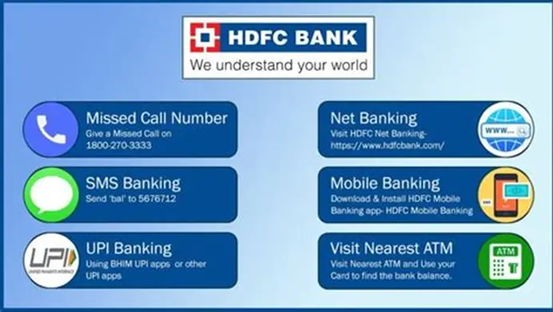
HDFC NetBanking is mainly designed for desktop and browser-based banking, while mobile banking applications provide banking services through smartphones.
Both services offer similar features, including money transfers, bill payments, and account management. Customers can choose the platform based on their preferences and convenience.
Conclusion
HDFC NetBanking has transformed the way customers manage their finances by providing fast, secure, and convenient digital banking services. From checking account balances and transferring money to paying bills and managing financial products, the platform offers a complete online banking experience.
As digital banking continues to grow, services like HDFC NetBanking help customers save time, improve financial management, and access banking facilities anytime and anywhere. By following security guidelines and using official banking channels, customers can enjoy a safe and efficient online banking experience.
Alphabet Earnings Report: Key Highlights, Revenue Growth, AI Investments, and Future Outlook
ITR Managed Service Provider Penalty: Everything Businesses Need to Know in 2026